Gemini Hub Blue-Green Status LED Flashing

While this shouldn't affect performance, the Gemini Hub having a blue-green flashing sequence points to an issue with the firewall. This flashing happens when the Hub is trying to get a response from the PC but the firewall is blocking it. This article details the steps to remedy this issue on Windows.
1. Open Windows Defender Firewall with Advanced Security.
2. Click Inbound Rules and New Rule:
3. Click on Predefined --> File and Printer Sharing and click Next:
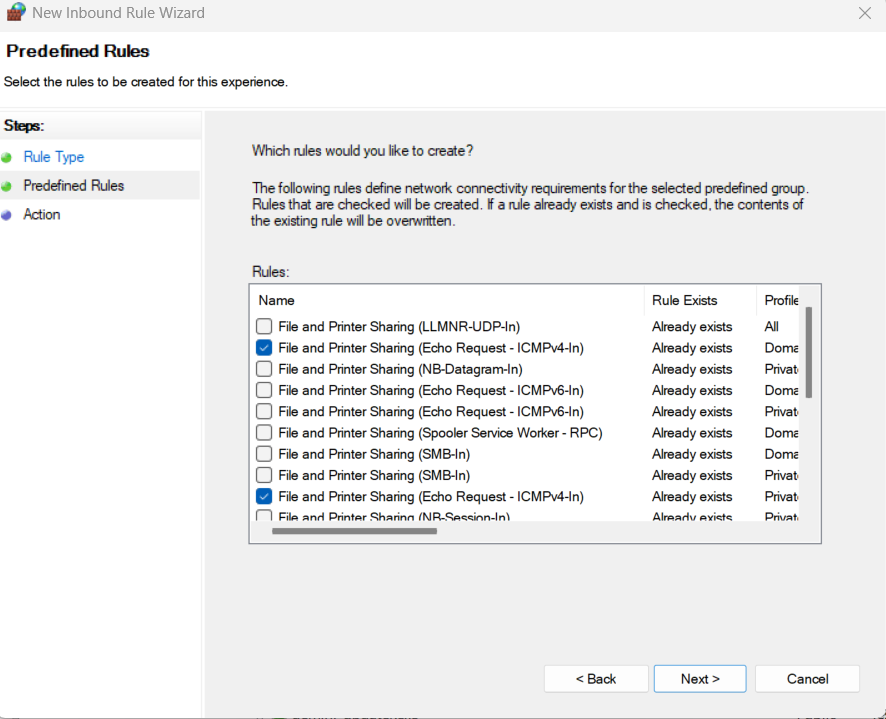
4.Click on Echo Request - ICMPv4 - In Domain as well as Private and click Next:
5. Lastly, click Allow the connection and click Finish:
5. Lastly, click Allow the connection and click Finish:
This should stop the flashing, and the status LED should now stay green.